Feature · Location
Where I am, in their language.
Tap the attachment, choose Location, send. The other phone shows the pin on a map, with the address rendered in the language they read. Live updates if you choose; a single moment if you don’t.
In the app
Share Live Location, or Send Your Current Location.
The Send Location screen opens to a map with the place names labelled in your language. Two buttons sit at the bottom: Share Live Location for a moving pin across a window of time, or Send Your Current Location for a single spot, sent once and done.
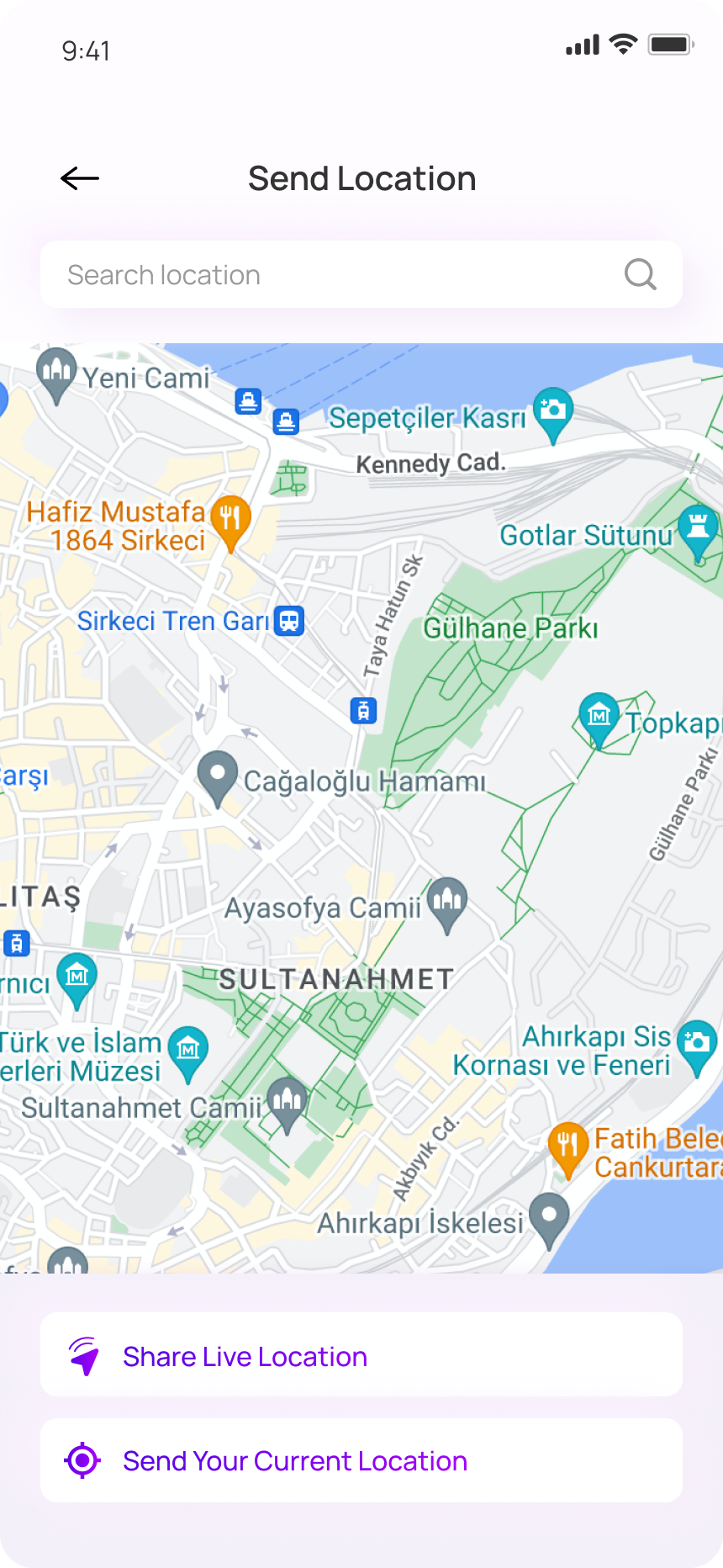
The address you’re standing at might be hard to read for the person you’re sending it to. We pass the place name through translation the same way we pass everything else. The street name stays as-is — it’s a proper noun the taxi driver will need — but the surrounding label (the café, the museum, the park) lands in their language.
Live location runs in fifteen-minute, one-hour, or open windows. We show a small banner on both phones while it’s on, so nobody forgets they’re still sharing. Tap the banner to stop at any time.
The location is shared with that chat and only that chat. We don’t hold the trail on our side, and we don’t make it visible to anyone else who happens to use the same group thread later.
A small moment
Finding your host in a city you arrived in tonight.
Your host writes from the apartment in Lima. The street name is on the door above your head; the building number is somewhere you can’t see. You send your live location with a fifteen-minute window.
She walks down to the corner, finds you, waves. The window closes on its own a few minutes later. You go inside.